Battery Compatibility Checklist
Before buying a replacement laptop battery, compare more than just the laptop brand. The safest match comes from checking the original battery part number, laptop model, voltage, connector, shape and product compatibility list together.
1. Check Whether the Battery Is Compatible with Your Laptop
Start by finding either the laptop model number or the original battery part number. A battery part number is usually more accurate because the same laptop series may support more than one battery type.
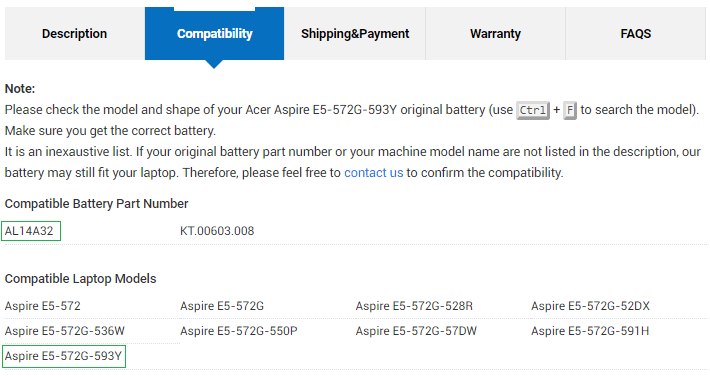
- Find your laptop model, for example Acer Aspire E5-572G-593Y.
- Find your original battery part number, for example Acer AL14A32.
- Open the replacement battery product page.
- Check whether your battery part number appears in the Compatible Battery Part Number table.
- Check whether your laptop model appears in the Compatible Laptop Models table.
If your exact part number or model is not listed, do not order based on appearance alone. Please contact us with photos of the original battery label and laptop model.
Example: compatibility tables
2. Compare the Main Battery Specifications
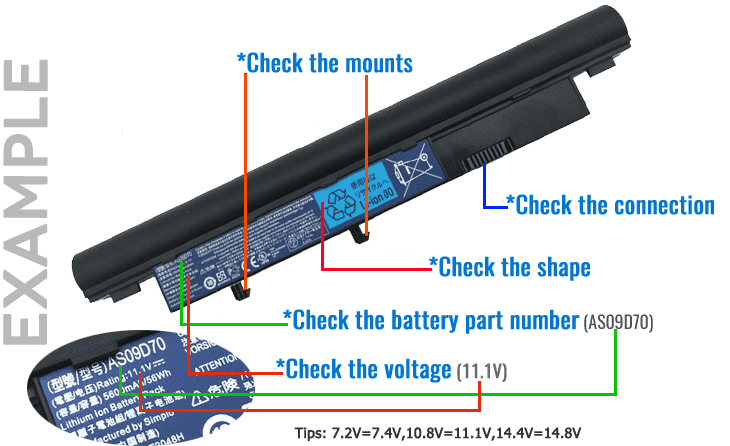
After confirming the product appears compatible, compare the technical specifications with your original battery. This step helps avoid wrong voltage, wrong shape, wrong connector or unsuitable capacity.
- Compare the battery part number and compatible model list.
- Compare the voltage rating printed on the battery label.
- Compare capacity, usually shown as mAh or Wh.
- Compare the connector position and battery contacts.
- Compare the physical shape, screw holes, locking points and overall size.
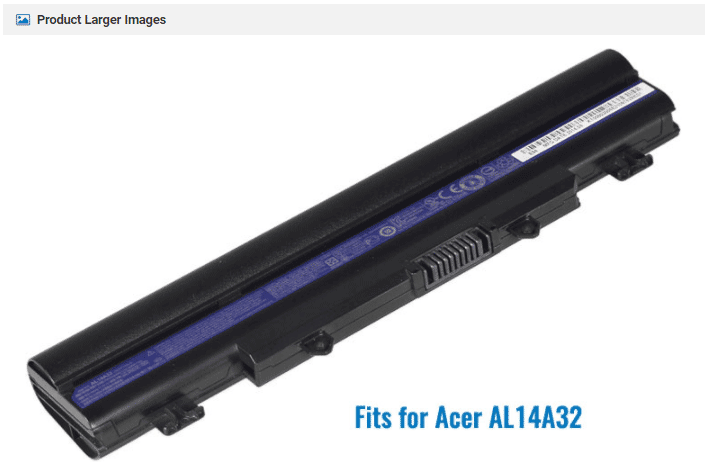
- Review product images carefully before ordering.
3. Voltage and Capacity: What to Check
The voltage of the replacement battery should be compatible with your laptop and original battery. Capacity affects runtime but does not automatically mean compatibility.
Voltage
Check the voltage printed on your original battery label and compare it with the replacement product page. Common laptop battery voltages include values such as 10.8V, 11.1V, 14.4V or 14.8V. Some voltage pairs may be compatible in certain battery families, but you should not assume compatibility unless the product page lists your part number or model.
Capacity
Capacity may be shown in mAh or Wh. A higher capacity battery may offer longer runtime, but it may also be larger or heavier. Always check the shape and product notes before ordering a higher-capacity version.
4. Shape, Connector and Product Images
Even if the part number looks similar, the battery must physically fit your laptop. Compare the product images with your original battery before ordering.
- Check the connector or contact position.
- Check the battery length, width and thickness.
- Check tabs, clips, screw holes and locking points.
- Check whether the battery is internal or removable.
- Check whether the product image matches your original battery shape.
Example: product larger images
5. High-Capacity Batteries May Be Larger
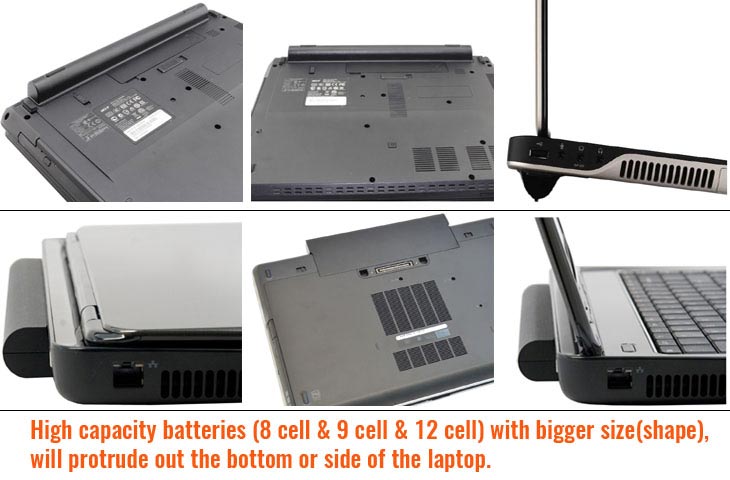
Some high-capacity laptop batteries are physically larger than the standard battery. They may extend from the bottom or back of the laptop by about one inch, depending on the design.
- Check the product description for high-capacity or extended battery notes.
- Review the product image carefully to see whether the shape is larger than the original battery.
- Make sure you are comfortable with the battery extending outside the laptop body.
- If you need the original slim shape, choose the standard-capacity version where available.
6. What to Do If You Are Not Sure
If any detail does not match, or if you cannot confirm compatibility, please contact us before placing an order. This is especially important for internal batteries, high-capacity batteries, or laptop models with several battery options.
Send us these details
Laptop brand and full model numberOriginal battery part numberPhoto of the battery labelPhoto of the connectorPhoto of the battery shape
Helpful guides: How to Find Your Laptop Model Number and How to Search for the Correct Laptop Battery.
Battery Specification FAQ
Is a matching laptop model enough?
Not always. Some laptop model families support more than one battery. Check the battery part number, voltage, shape and connector as well.
Can I use a higher-capacity battery?
Only if the product page lists your laptop or battery part number as compatible. Higher-capacity batteries may be physically larger.
What if the voltage is slightly different?
Do not assume it is compatible. Some voltage pairs may work within specific battery families, but you should only order when the product page lists your model or part number as compatible.
What if the battery looks the same?
Appearance is not enough. The connector, voltage, locking points and part number must also be checked.