Battery Part Number Guides by Brand
Asus Battery Part Number Identification
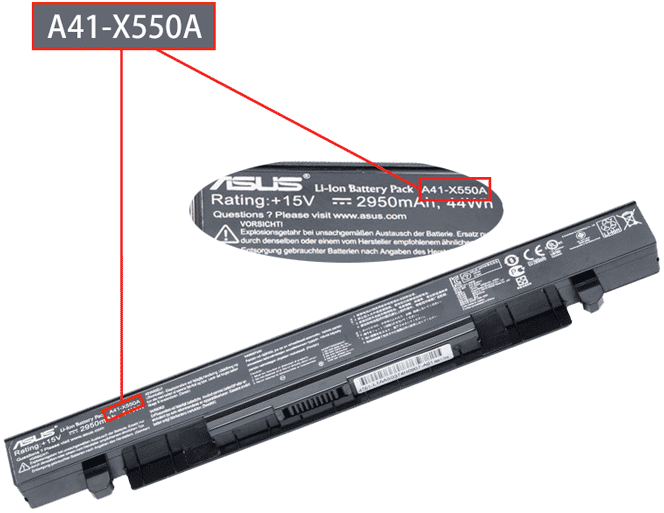
Asus battery part numbers are often printed as codes such as A32, A41, AL or long service numbers. These codes are the best keywords to use when searching for a replacement battery, because many Asus laptop series share similar model names but use different battery packs.
Quick steps
- Turn off the laptop and unplug the charger.
- Remove the battery if it is removable, or check the internal battery label safely.
- Look for Model, Type, P/N or a barcode label on the battery.
- Copy the full Asus battery code exactly, including dashes.
- Before ordering, compare voltage, connector position, capacity and compatible laptop model list.
Common Asus battery part number examples
A41-X550A
A32-F3
AL23-901
90-NE51B2000
0B110-00240100E
Compatibility tip: If two Asus batteries look similar, do not rely on appearance alone. The connector and voltage must also match.
FAQ
Can one Asus model use different batteries?
Yes. A model family can have different screen sizes, battery shapes or capacities, so the part number is important.
Should I include dashes when searching?
Yes. Search the full code first, then try the same code without dashes if needed.