Battery Part Number Guides by Brand
Apple Battery Part Number Identification
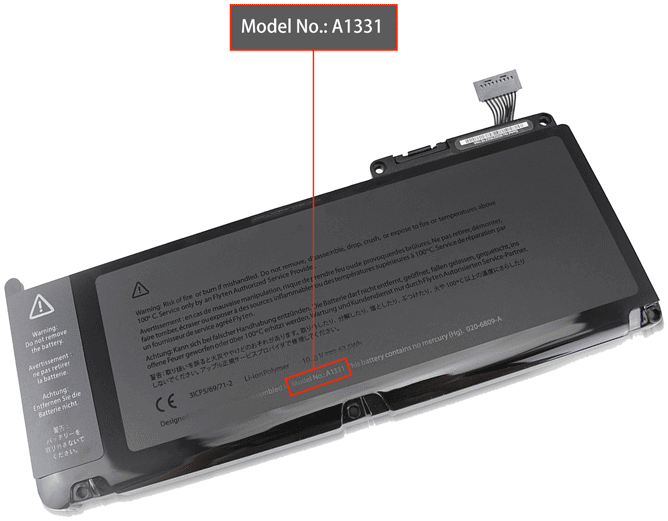
For Apple MacBook batteries, the most useful compatibility codes are usually printed on the battery itself or listed as Apple service part numbers. Searching by the battery number is more precise than searching only by MacBook model name, because similar MacBook models may use different internal batteries.
Quick steps
- Shut down the MacBook and disconnect the power adapter.
- Check the battery label if the battery is accessible. For internal batteries, ask a technician if you are not experienced with opening the device.
- Look for codes beginning with A, Apple service numbers, or printed replacement part numbers.
- Record the complete code exactly as shown, including slashes and dashes.
- Compare the part number, MacBook model, year, connector and battery shape before ordering.
Common Apple battery part number examples
A1331
A1396
020-6380-A
M9325G/A
MB471LL/A
661-4833
Compatibility tip: Apple model numbers and marketing names can be similar, so check the battery part number together with the MacBook model identifier and year whenever possible.
FAQ
Is the A-number enough?
It is a very useful starting point, but you should still confirm the MacBook model and physical battery layout before buying.
What if my MacBook battery is built in?
Do not force the cover open if you are unsure. Send us your MacBook model information and we can help narrow down the correct replacement.