Battery Part Number Guides by Brand
Lenovo and IBM Battery Part Number Identification
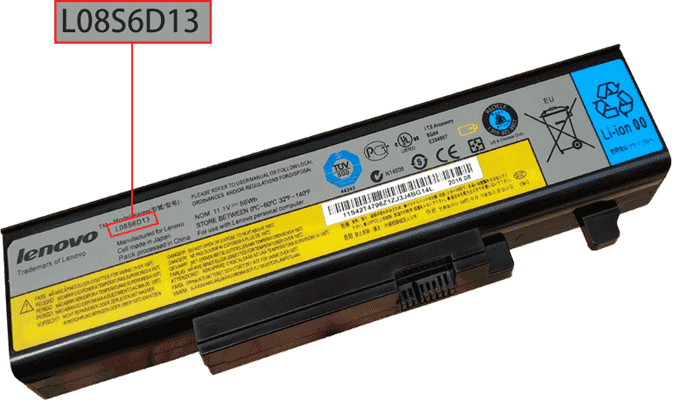
Lenovo and IBM replacement batteries may list several useful identifiers, including battery model codes, FRU numbers and ASM numbers. These codes are excellent search terms because ThinkPad and IdeaPad model names can cover multiple battery options.
Quick steps
- Power off the laptop and remove the charger.
- Remove the battery if it is removable, or inspect the internal battery label safely.
- Look for FRU, ASM, P/N, Model or barcode text.
- Copy the complete code, including any leading zero, dash or space.
- Search by FRU, ASM or battery model number, then compare voltage, shape and compatible model list.
Common Lenovo battery part number examples
L08S6D13
45N1001
0A36302
Common IBM battery part number examples
FRU 02K6928
ASM 92P1138
02K6824
Compatibility tip: For ThinkPad batteries, FRU numbers are especially useful. If several compatible FRU numbers are listed on a product page, any of them may identify the same replacement family.
FAQ
What is a Lenovo FRU number?
FRU means Field Replaceable Unit. It is a service replacement identifier used to match compatible parts.
Should I search by FRU or laptop model?
Search by FRU or battery model first, then use the laptop model as a secondary compatibility check.