Acer, Gateway and eMachines Battery Part Number Identification
Acer, Gateway and eMachines batteries often use the same replacement part families. The most reliable way to find a compatible replacement battery is to search by the battery part number printed on the original battery label, not only by the laptop model name.
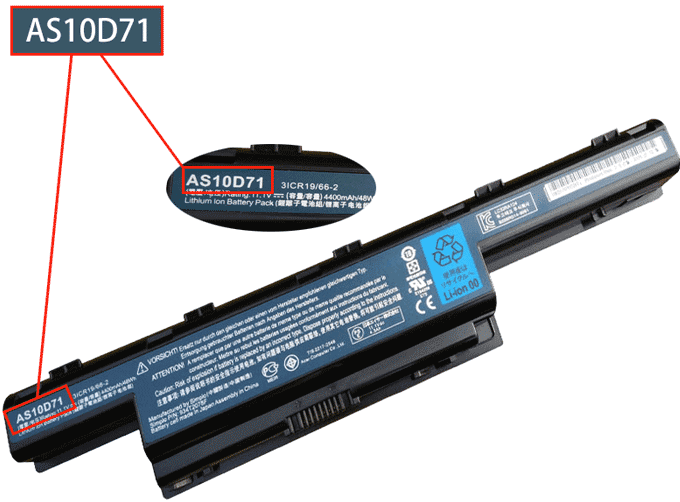
A battery part number is the manufacturer's unique identifier for that battery pack. It is usually printed near the barcode, rating label or regulatory text on the removable battery. If the battery is built in, remove the bottom cover only if you are comfortable doing so, or ask a technician to read the label for you.
Quick steps
- Power off the laptop and disconnect the charger.
- Remove the battery if it is removable, or inspect the battery label after the cover is safely opened.
- Look for labels such as Model, Part No., P/N, Replace or barcode text.
- Write down the full code, including letters, numbers, dots and dashes.
- Search our website using the part number first, then compare voltage, capacity, shape and connector before ordering.
Common Acer battery part number examples
AS10D71
AS09A61
916C4820F
AK.006BT.021
BT.00403.001
Compatibility tip: A laptop model can support more than one battery shape or voltage. Always compare the part number and the physical battery details with the product page. If you are unsure, send us a photo of your battery label and laptop model before purchasing.
FAQ
Can I search only by laptop model?
You can, but the battery part number is usually more accurate because one laptop series may use several battery versions.
What if the label is worn or missing?
Search by laptop model and battery shape, then contact us with photos of the battery, connector and laptop label so we can help confirm compatibility.