Battery Part Number Guides by Brand
HP and Compaq Battery Part Number Identification
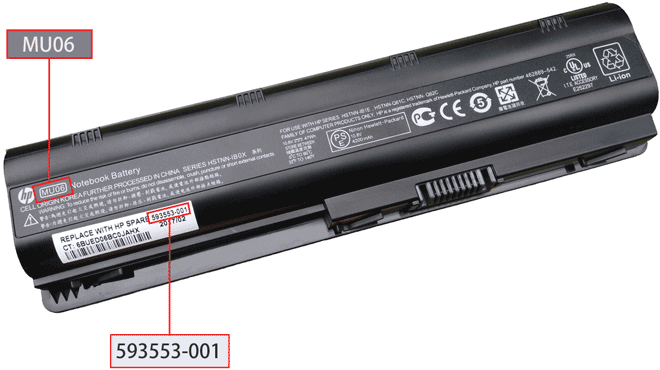
HP and Compaq batteries are often identified by a white barcode sticker. The most useful codes may appear as Replace with HP spare, a six digit code plus dash and three digits, an HSTNN code, or a short battery model such as MU06 or KI04.
Quick steps
- Turn off the laptop and disconnect the power adapter.
- Remove the battery if removable, then inspect the white barcode sticker and rating label.
- Look for Replace with HP spare, Spare, HSTNN, Model or P/N.
- Record the complete number exactly, including dashes.
- Search by the HP spare number or HSTNN code, then compare voltage, shape, connector and compatible model list.
Common HP and Compaq battery part number examples
MU06
KI04
593553-001
HSTNN-104C
Compatibility tip: HP batteries can show several numbers on the same label. The HP spare number and HSTNN code are both useful for cross-reference searches.
FAQ
What is an HP spare number?
It is an HP replacement part number printed on the battery label, often shown after "Replace with HP spare".
Is HSTNN enough to identify the battery?
Often yes, but if possible also compare the HP spare number, voltage and battery shape.