Battery Part Number Guides by Brand
Samsung Battery Part Number Identification
Samsung batteries may use part numbers beginning with AA, BA or EB depending on the device type. The exact battery part number is the best search term for laptop and tablet replacement batteries.
Quick steps
- Power off the device and remove the charger.
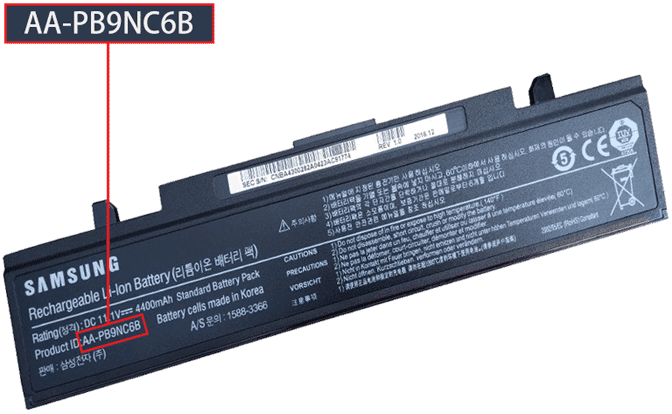
- Check the original battery label or internal battery label safely.
- Look for Model, P/N, AA, BA, EB or barcode text.
- Record the complete code exactly as printed.
- Compare the code with voltage, capacity, connector and compatible device list before purchase.
Common Samsung battery part number examples
AA-PB9NC6B
PBVN3AB
BA43-00358A
EB-BT530FBU
Compatibility tip: Samsung laptop and tablet batteries can look similar but differ in connector, thickness or voltage. Use the part number plus device model for the safest match.
FAQ
Can Samsung tablet battery numbers be used for search?
Yes. Codes such as EB-BT530FBU are useful for identifying tablet batteries.
What if the battery has both model and serial number?
Search by the model or part number, not the unique serial number.