Battery Part Number Guides by Brand
Dell Battery Part Number Identification
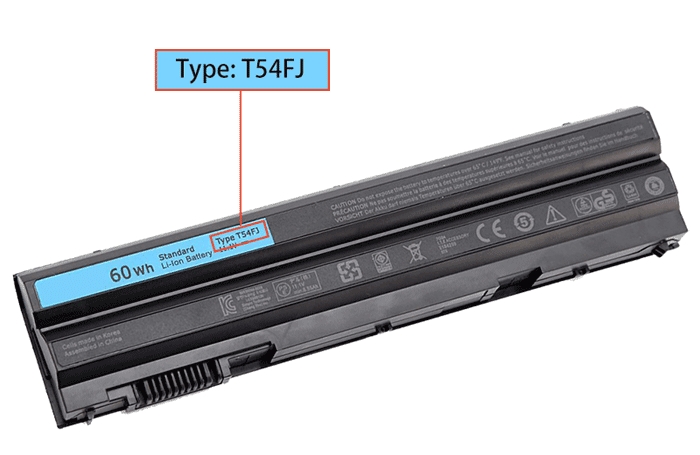
Dell replacement batteries are commonly searched by short alphanumeric part numbers. The part number is usually printed on the battery label and is more accurate than the laptop series name when choosing a replacement.
Quick steps
- Power off the Dell laptop and disconnect the AC adapter.
- Remove the battery if possible, or inspect the internal battery label safely.
- Look for a short code near Type, DP/N, P/N or the barcode.
- Write down the full code and check for similar-looking characters such as 0 and O.
- Use the part number to search, then verify voltage, capacity, connector and compatible Dell model list.
Common Dell battery part number examples
T54FJ
M5Y0X
KM978
M5Y1K
JWPHF
R795X
Compatibility tip: Dell batteries may share the same laptop family but differ by watt-hour rating or physical design. Match the label code and product specifications before ordering.
FAQ
Is the Dell service tag the same as the battery part number?
No. The service tag identifies the laptop, while the battery part number identifies the battery pack.
Can I use a higher capacity Dell battery?
Only if the product page lists your model as compatible and the voltage, connector and shape match.